Itemized expenses
See what you actually bought, not just how much the trip to the store cost.
Receipt scanner app
Take a photo of a receipt or choose one from your photo library. Rizur reads it and fills in the merchant, total, date, and each purchased item with its price and category. You review the extracted details, fix anything that's off, and save. The receipt image is deleted after processing unless you attach it on purpose.
Free to downloadCore tracking stays free
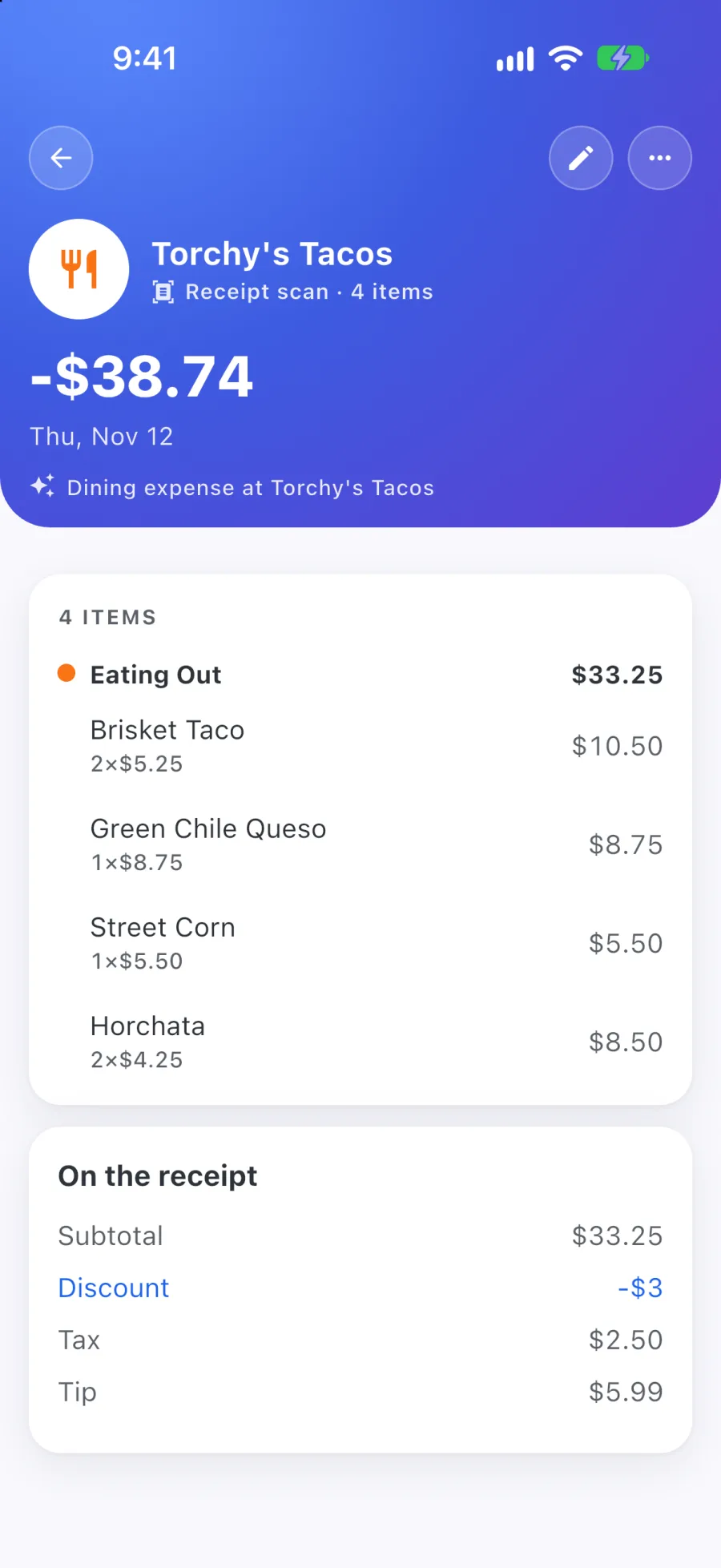
Capture the receipt with your camera or choose a photo you already took.
Merchant, date, total, and line items are extracted and sorted into categories.
Edit any item, price, or category before the expense is saved.
See what you actually bought, not just how much the trip to the store cost.
Each line item can carry its own category, so a mixed grocery run still adds up correctly.
Every extracted detail stays editable, before you save and after.
Receipt images are deleted after processing. Saved details and attachments you choose to keep remain.
A few useful answers
Rizur is designed to feel simple, while keeping the important details and decisions in your hands.
Yes. You can take a new photo or choose an existing one from your photos.
Yes. Rizur extracts line items with their prices and categories, along with the merchant, date, and total.
Every extracted detail is reviewable and editable before you save, and you can edit the expense later too.
Every account includes some free Voice Entries and Receipt Scans, and failed attempts don't count. Premium continues AI access, subject to fair-use limits. Current pricing is shown before purchase.